 RunnerDeck
Community
RunnerDeck
Community
RunnerDeck
Community
RunnerDeck
Community
See their real GitHub-reported status, see whether the local process is
actually running, tail logs live, and start/stop/restart a whole pool,
one at a time or all at once. No hand-editing pidfiles, no SSHing in
to run ps aux | grep.
Plain PHP, no framework, no build step, no Composer dependencies. A bit of vanilla JS. That's it.
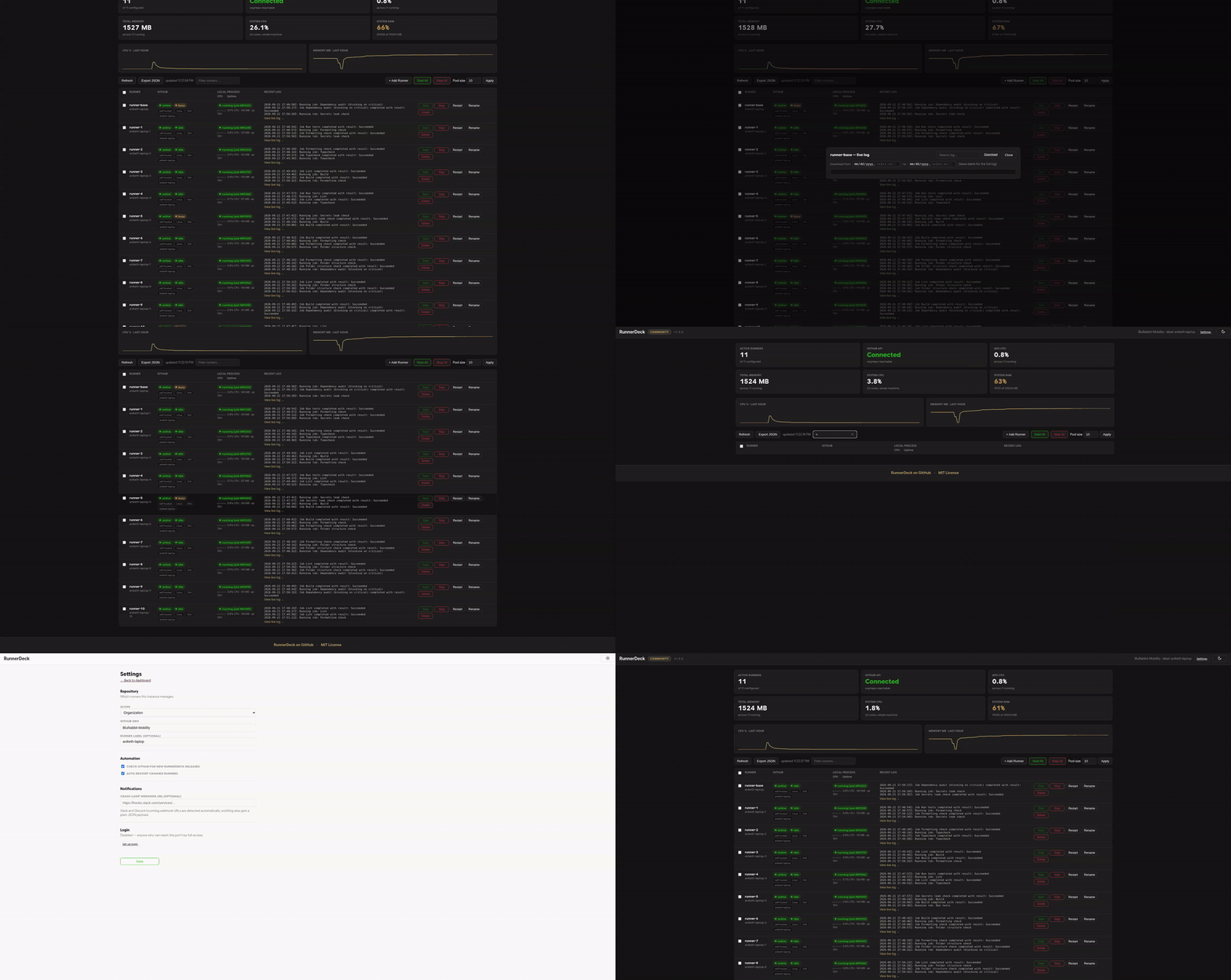


No agent, no cloud service, no telemetry. It reads the same files and calls the same GitHub API your terminal would.
Reads each runner's .runner config and runner.pid directly, with a live scan as a fallback: /proc on Linux, ps/lsof on macOS, CIM on Windows. A runner never goes silently "invisible" just because its pidfile went stale.
Starting an unconfigured slot downloads the official runner package for your OS/arch, checksum-verifies it, requests a fresh registration token, and runs config.sh. The same flow you'd do by hand, done for you.
Before any Stop, Rename, or Delete, it checks GitHub's busy flag and asks for confirmation if the runner is mid-job, or if that status can't be verified at all.
Give a runner its own GitHub-registered name, rename it later (deregisters and re-registers cleanly), or delete it permanently. Binaries, config, and logs included.
Per-runner usage via ps, plus a rolling one-hour pool-wide history chart backed by a small local SQLite file. No fabricated trends. If there's no data, it says so.
Manage runners across a GitHub org you admin, or scope everything to one repo you own. No org access required, configurable straight from the UI with a first-run setup screen.
Localhost-only with no login by default. Want to reach it from another device? bin/setup-totp.php adds an authenticator-app code gate — put a TLS-terminating reverse proxy in front and you're covered.
Auto-restart brings a crashed runner back up, backing off after a few failed attempts instead of retrying forever. An optional webhook — Slack and Discord URLs detected automatically — tells you the moment it happens, even with no dashboard tab open.
Host CPU/RAM history, per-runner crash counts, a webhook outbox that retries and then tells you it gave up, and a daily host bundle you can download if the machine dies. Same local files the dashboard already keeps.
GitHub, Pool, Alerts, Access, and Host are tabs, not one long scroll. Hover help on Drain, Pause AR, and the rest. The shell stays lined up from the sticky header down to a phone-width table.
Modern versions of Linux, macOS, and Windows, not every version ever shipped. See Getting started for the exact version floors.
| Platform | Support | Notes |
|---|---|---|
| Linux | Native | PHP 8.1+ with posix/pcntl (Fedora/RHEL: install php-process). CI runs PHPUnit on Ubuntu latest and 22.04 (x64 + arm), distro apt PHP on Ubuntu 22.04 and Debian 12, distro dnf PHP on Fedora, Rocky 9, and RHEL UBI 9, plus an Alpine/musl boot smoke. |
| macOS | Native | Process liveness falls back to ps/lsof (no /proc on Darwin). CI unit-tests PHP 8.1 and 8.5 on macOS 15, 8.5 on macOS latest, and 8.5 on Intel (macos-15-intel). Homebrew sets the real macOS version floor. |
| Windows | Native, or via WSL2 | run.ps1 runs natively and manages Windows runners (config.cmd/run.cmd), so runs-on: windows jobs work. Needs PHP 8.1+ on PATH and gh; processes are controlled with PowerShell and taskkill, so posix/pcntl are not needed. Stop is always forced, the built-in server is single-threaded, and CI runs the Windows tests plus a real PowerShell/taskkill smoke on windows-latest and windows-2022 (not the full suite). run.ps1 -Wsl manages Linux runners inside WSL2 instead. |
| Docker | docker compose up | Alternative to installing PHP, or WSL2 on Windows, at all — docker compose up --build. CI builds the image and boots it on every push. |
RunnerDeck itself is free and stays that way. Cloud is for teams who'd rather not run the dashboard themselves.
What's on this page. Self-hosted and local-only, MIT licensed. It runs on your own machine and talks to your own GitHub account — nothing leaves it.
gh loginA hosted version of RunnerDeck for teams managing runners across multiple machines, with nothing to install or keep running yourself.
No .env required to get started. The dashboard walks you through setup on first load.
# clone and run, no build step, no composer install needed
git clone https://github.com/AnikethTS/RunnerDeck.git
cd RunnerDeck
./run.sh                    # binds 127.0.0.1:8090

# open http://127.0.0.1:8090/, pick org or repo scope on the setup screen

# or, no PHP install needed:
docker compose up --build